


Table of Contents
Walk into any good shop and you can feel the difference: the staff know what matters, the checkout is quick, and the offer on the screen actually makes sense. In 2026, Dynamics 365 Commerce in-store personalisation is one of the most practical ways to deliver that kind of service at scale, without asking store teams to memorise a thousand customer details.
Start with what “personal” means on the shop floor
Personalisation often gets treated like a marketing trick, but in-store it’s more grounded. It’s recognising the customer, understanding their context, and helping them make a decision without fuss.
Dynamics 365 Commerce supports this because it brings point of sale, promotions, customer profiles, and fulfilment workflows into the same operating model. Microsoft positions Commerce as a unified omnichannel platform that can share customer and order data across channels, which matters when shoppers bounce between online browsing and in-store buying.
Personalisation is what happens when the right information shows up for the right staff member, at the right time, with clear permission to use it.
Put associates at the centre, not the algorithm
The best in-store experiences still rely on people. Technology should support them, not get in the way.
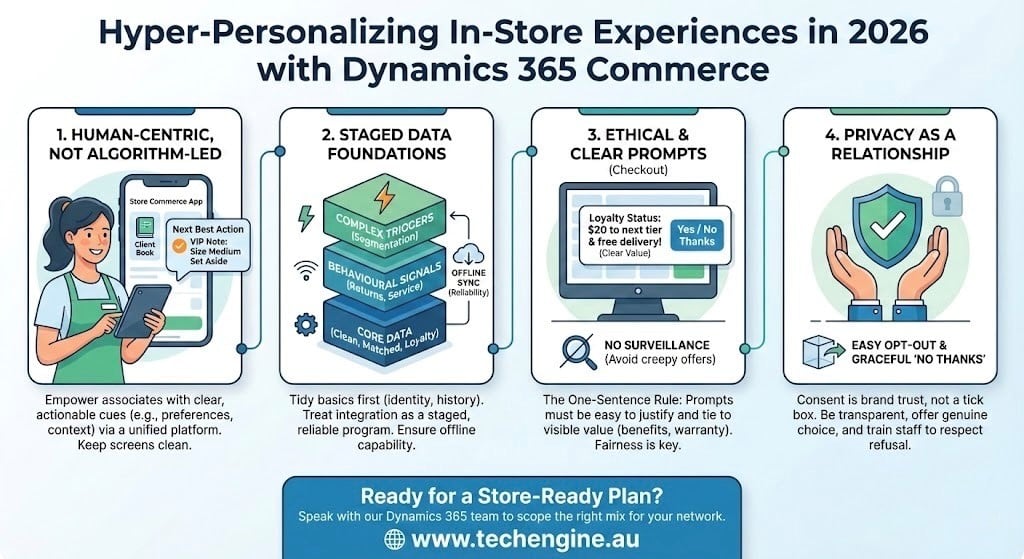
Store teams can use the Store Commerce app to manage key customers through a client book, capture notes, and record activities against a customer profile.
Microsoft also notes that integrating Store Commerce with Customer Insights can provide cues about the “next best action” for each customer.
That combination is where hyper-personalisation becomes real. It’s not only “recommended products”. It’s also the small operational touches: a reminder that a customer prefers email receipts, a note that they’re shopping for a gift, or a prompt that a VIP customer has arrived and asked for a particular size to be put aside.
One tip: keep the “associate view” clean. If every screen is packed with data, staff will ignore it. Aim for a short list of prompts that are easy to act on during a busy shift.
Make data reliable before you make it fancy
Hyper-personalisation fails when the data is patchy or out of date. Retailers usually need to tidy the basics first: identity matching (who is this customer?), product data quality, and transaction history.
This is where Dynamics 365 Customer Insights + Commerce integration becomes valuable.
Treat the integration as a staged program rather than a one-off IT task:
- Start with core entities (customers, transactions, loyalty).
- Add behavioural signals later (returns patterns, preferences, service interactions).
- Only then introduce more complex triggers and segmentation.
If the store network includes patchy connectivity, also pay attention to offline considerations for POS and how updates sync back cleanly. Commerce is designed to support modern Store Commerce POS operations, including scenarios across in-store and pickup workflows.
Personalised offers at checkout: keep them fair and specific
Checkout is where “personalised” can quickly turn into “pushy”. The simplest rule is: every prompt should be easy to justify to a customer in one sentence.
Dynamics 365 Commerce includes a loyalty upsell prompt in POS designed to show customers their loyalty status and how close they are to the next tier, giving associates a clear, factual reason to raise the topic.
That’s a strong pattern for 2026:
- Use prompts that reflect what the customer has chosen to participate in (loyalty, membership).
- Tie prompts to visible value (points, benefits, warranty coverage, delivery options).
- Avoid offers that feel like surveillance (for example, referencing browsing behaviour in-store unless the customer has explicitly opted in and expects it).
Microsoft Dynamics 365 consulting still matters in 2026
Dynamics 365 consulting for retailers
Many retailers underestimate how much the in-store experience depends on configuration choices: how customer profiles are structured, what associates can see, which prompts appear at POS, and how consent is captured across channels.
The quickest wins often come from careful design work rather than heavy custom development. A Dynamics 365 consulting partner can also help set governance early, so personalisation doesn’t become a tangle of exceptions and one-off campaigns across stores.
A useful litmus test when you’re planning the work: can a store manager explain, in plain language, why the system is making a given suggestion? If the answer is “no”, the design probably needs another pass.
Privacy and trust: don’t treat consent as a box to tick
Australians are increasingly alert to how their data gets used, and retail loyalty schemes have been under scrutiny for years. Consent isn’t only a legal concept, it’s also part of the brand relationship.
The Office of the Australian Information Commissioner explains that consent may be required in certain situations to collect personal information, and to use or disclose personal information for a purpose beyond the one it was collected for.
For retailers, the practical takeaway is simple:
- Be clear about what data you collect and why.
- Offer genuine choice (including easy opt-out).
- Train staff to handle “no thanks” gracefully, without penalty or awkwardness.
Ready to turn these ideas into a store-ready plan? Speak with Tech Engine Australia’s Dynamics 365 team to scope the right mix of Commerce, customer data, and associate workflows for your network.
Frequently Asked Questions:
1) What does “hyper-personalisation” mean for a physical store in 2026?
It means using customer-approved information to make shopping simpler in real time. In practice, that might be recognising loyalty status at POS, showing relevant fulfilment options, or giving associates a short customer summary before they start helping. If it doesn’t reduce effort for the customer or the staff member, it’s not worth doing.
2) How does Dynamics 365 Commerce support store associates with personal service?
Dynamics 365 Commerce can surface customer profiles, purchase history, and loyalty details during assisted selling and checkout. With the client book approach, associates can keep notes and track interactions so the next visit feels consistent. Store teams should only see information that helps them serve, not a long list of irrelevant data fields.
3) Do I need Customer Insights to personalise in-store, or is Commerce enough?
Commerce can handle many in-store personalisation needs on its own, especially around loyalty and transactional history. Customer Insights becomes more useful when you want stronger identity matching, segmentation across channels, and a consolidated customer view that pulls from multiple systems. Retailers often start with Commerce basics, then expand once data quality is stable.
4) What’s a sensible first use case that won’t annoy customers?
Loyalty progress prompts at checkout are usually well received because they’re transparent and value-based. If a shopper is close to the next tier, the associate can explain the benefit plainly and let the customer decide. This is less risky than surprise recommendations based on behavioural tracking, which can feel intrusive if consent isn’t clear.
5) How should Australian retailers think about consent when personalising?
Aim for clarity and restraint. If you want to use personal information for something beyond the original purpose, consent may be required, and customers should understand what they’re agreeing to. Keep consent language readable, make opt-out easy, and train staff to answer questions without jargon. Trust is hard to win back once it’s lost.